Apache Airflow
The Data Contract Provider for Apache Airflow runs datacontract test as a task in your DAGs:
DataContractTestOperatortests a contract against real data and fails the task when the contract is violated, so bad data stops before it propagates downstream.- Per-check results are rendered in the task log (pass/fail, reason, model/field).
- The full run report is pushed to XCom in the test-results API model, so downstream tasks can branch on the outcome.
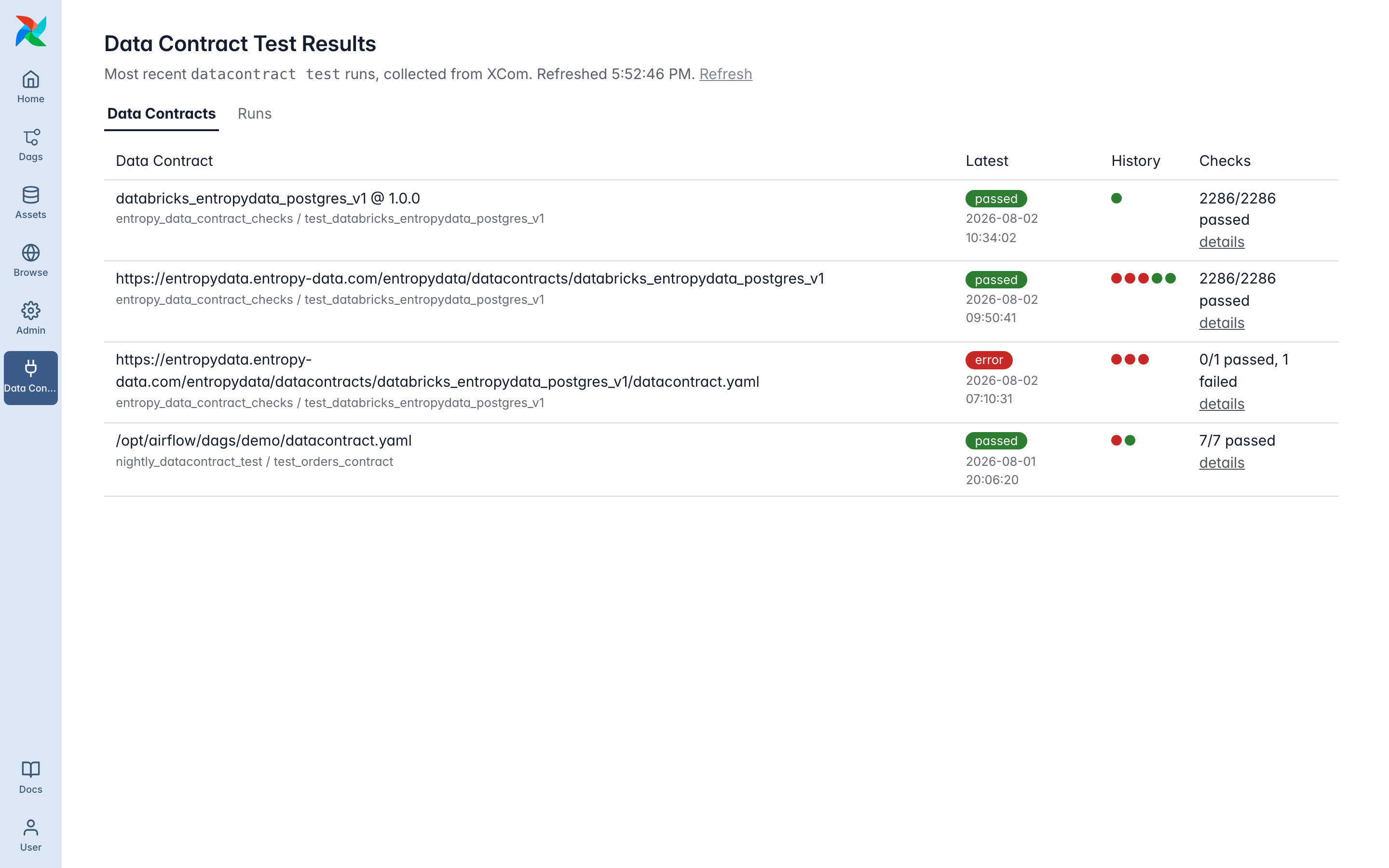
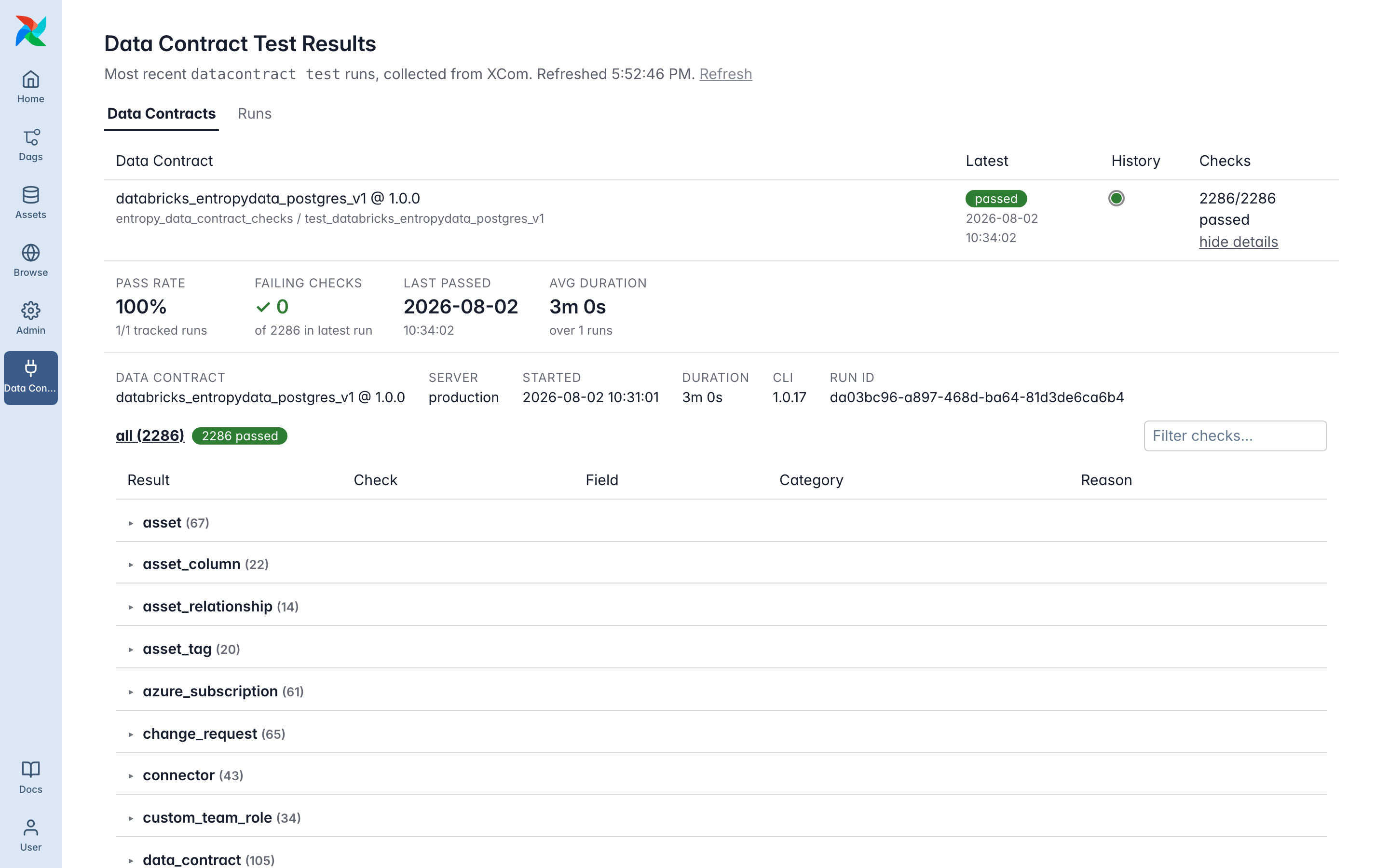
- On Airflow 3, a "Data Contract Results" view in the UI shows the state of all tested contracts, with run history, per-contract stats, and per-check details.
- A "Test Results" button on the task instance links to the published results, e.g. in Entropy Data.
Installation
Install the provider on your Airflow workers. Extras are passed through to the Data Contract CLI and select the data source support:
pip install "airflow-provider-datacontract[snowflake]"
Available extras: duckdb (local files, csv/parquet), snowflake, databricks, bigquery, postgres, s3, azure, kafka, trino.
In a containerized deployment, add it to your Airflow image:
FROM apache/airflow:3.1.6
RUN pip install --no-cache-dir "airflow-provider-datacontract[databricks]"
The provider requires Apache Airflow 2.10+ and Python 3.10+. The results view in the UI requires Airflow 3.1+.
Set up connections
Credentials are resolved through Airflow's connection machinery, including any configured secrets backend (Vault, AWS Secrets Manager, Azure Key Vault, …). The connection is mapped to Data Contract CLI configuration based on its type and passed programmatically; credentials never touch the process environment.
Create a connection for the server under test, for example Databricks with a service principal:
airflow connections add databricks_prod \
  --conn-type databricks \
  --conn-host adb-1234567890123456.7.azuredatabricks.net \
  --conn-login "<oauth-client-id>" \
  --conn-password "<oauth-client-secret>" \
  --conn-extra '{"http_path": "/sql/1.0/warehouses/abc123"}'
Supported connection types: databricks (host, extra http_path; token auth: password = token, login empty; service principal OAuth: login = client id, password = client secret), snowflake (login/password, extra account, warehouse, role), postgres, mysql, oracle, impala, trino, mssql, redshift (login/password/host/port/schema), aws (login/password = key pair, extra region_name), google_cloud_platform (extra key_path, project), wasb/azure, and kafka. For anything else, add datacontract_-prefixed keys to the connection extra (e.g. datacontract_trino_jwt_token); those pass through to any configuration field and also override the mapped values.
To publish test results to Entropy Data, create a connection with the entropydata type. The API key goes in the password field; the host is optional (default https://api.entropy-data.com):
airflow connections add entropy_data \
  --conn-type entropydata \
  --conn-password "<api-key>"
Test a data contract in a DAG
from datetime import datetime
from airflow.sdk import dag
from datacontract_provider.operators.datacontract import DataContractTestOperator


@dag(schedule="0 2 * * *", start_date=datetime(2026, 1, 1), catchup=False)
def nightly_datacontract_test():
    DataContractTestOperator(
        task_id="test_orders_contract",
        data_contract_file="https://demo.datacontract.com/orders-latest/datacontract.yaml",
        server="production",
        server_conn_id="databricks_prod",     # credentials for the server under test
        entropy_data_conn_id="entropy_data",  # optional: publish results to Entropy Data
    )


nightly_datacontract_test()
data_contract_file accepts a local path or a URL, so the contract can live next to the DAG, in a Git repository, or on a data contract platform. When entropy_data_conn_id is set, test results are published to <host>/api/test-results automatically.
Operator parameters
| Parameter | Description |
|---|---|
data_contract_file | Path or URL of the data contract YAML (templated) |
data_contract_str | Contract as a YAML string, alternative to data_contract_file |
server | Server key from the contract's servers section to test against |
schema_name | Schema/model to test, defaults to all |
check_categories | Subset of schema, quality, servicelevel, custom |
server_conn_id | Airflow connection with credentials for the server under test |
entropy_data_conn_id | Airflow connection for Entropy Data (type entropydata) |
config | Dict of additional configuration fields, merged over the connection-derived values |
publish_url | URL to publish test results to (optional) |
results_web_url | Web page of the published results, shown as a "Test Results" button (optional) |
include_failed_samples | Collect samples of failing rows |
fail_on_warning | Also fail the task on result warning |
datacontract_kwargs | Extra kwargs for the DataContract constructor, e.g. spark |
Branch on the result
The operator pushes the full run report to XCom under the key datacontract_result, in the shape of the test-results API model (the Data Contract CLI Run):
{
  "runId": "da03bc96-...",
  "dataContractId": "orders",
  "dataContractVersion": "1.0.0",
  "server": "production",
  "timestampStart": "2026-08-02T02:00:04Z",
  "timestampEnd": "2026-08-02T02:03:05Z",
  "result": "passed",
  "checks": [
    {
      "category": "schema",
      "type": "field_type",
      "name": "Check that field order_id has type string",
      "model": "orders",
      "field": "order_id",
      "result": "passed",
      "engine": "datacontract-cli"
    }
  ],
  "logs": [{"level": "INFO", "message": "Running checks with ibis", "timestamp": "..."}]
}
None fields are omitted. This is the same JSON the CLI publishes to /api/test-results, so anything built against that API works against the XCom payload too. Downstream tasks can read it:
from airflow.sdk import dag, task


@task(trigger_rule="all_done")
def notify_on_failures(**context):
    report = context["ti"].xcom_pull(
        task_ids="test_orders_contract", key="datacontract_result"
    )
    failed = [c for c in report.get("checks", []) if c.get("result") in ("failed", "error")]
    if failed:
        send_slack_message(f"{len(failed)} contract checks failed for {report['dataContractId']}")
The operator itself fails the task when the run result is failed or error (and on warning with fail_on_warning=True), so a plain >> dependency is already a quality gate; use trigger_rule="all_done" for tasks that must run on failure, like notifications.
Results in the Airflow UI
On Airflow 3.1+, the provider adds a Data Contract Results entry to the navigation: a status board with one row per data contract, showing the latest result, a clickable run-history strip, and the check summary (a Runs tab keeps the raw run log):
Each contract expands into stats (pass rate over the tracked runs, failing checks, last passed, average duration) and the run detail: result counts as clickable filters, a text filter, checks grouped by model, per-check diagnostics and failed samples, and the run logs. Runs with problems open filtered to the not-passed checks, and each failure is annotated as new in this run or failing for several runs:
With results_web_url set, the task instance additionally shows a "Test Results" button that deep-links to the published results, e.g. in Entropy Data.
Further reading
datacontract testreference and Test your Data for the supported data sources- Configuration for all credential and connection options
- Integrate with Entropy Data for tracking results over time
- Provider repository on GitHub