What is Data Contract CLI?




The datacontract CLI is an open-source command-line tool for working with data contracts.
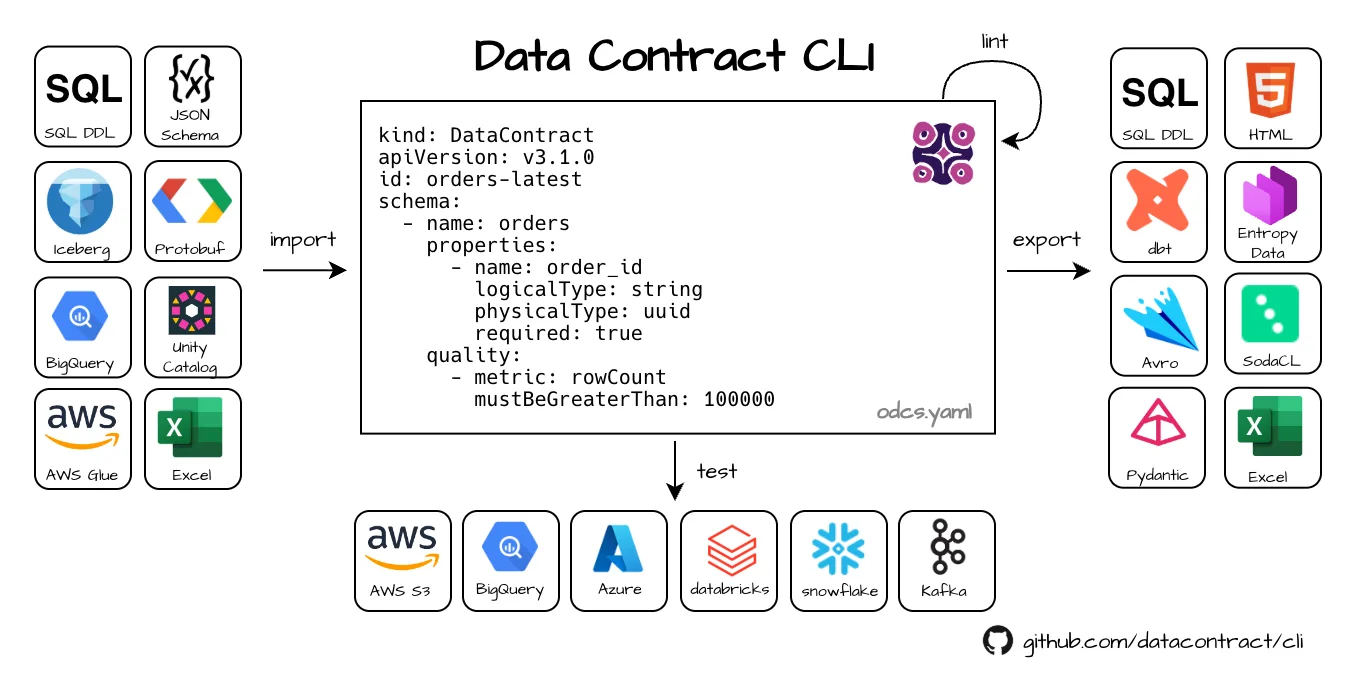
It natively supports the Open Data Contract Standard (ODCS) to:
- Lint data contracts and validate them against the ODCS JSON Schema.
- Connect to data sources such as Snowflake, BigQuery, Databricks, Postgres, Kafka, S3, and many more.
- Test that the actual data complies with the schema and quality expectations defined in the contract.
- Export a contract to 25+ formats (SQL DDL, dbt, Avro, JSON Schema, HTML, Protobuf, …).
- Import an existing schema (SQL, dbt, BigQuery, Glue, Excel, …) into a data contract.
The tool is written in Python. It can be used as a standalone CLI tool, in a CI/CD pipeline, or directly as a Python library.
Three commands take you from an existing warehouse table to a tested data contract:
uv tool install --python python3.11 --upgrade 'datacontract-cli[snowflake]'
datacontract import snowflake --source <account> --database ORDER_DB --schema PUBLIC --output datacontract.yaml
datacontract test datacontract.yaml
🟢 data contract is valid. Run 24 checks. Took 5.2 seconds.
The same flow works for BigQuery, Databricks, Postgres, and 15+ other sources — or try it on a local CSV file without any credentials.
Why data contracts?
A data contract is a machine-readable, versioned agreement that describes the structure, semantics, quality, and service levels of a data set. Because the contract is a single file, it can be:
- stored in Git next to your code,
- reviewed in pull requests,
- linted and tested automatically in CI/CD, and
- used to generate downstream artifacts (DDL, dbt models, schemas, documentation).
A typical contract has a servers section with endpoint details, a schema describing the structure and semantics of the data, plus service levels and quality attributes that describe expectations such as freshness and number of rows. This is enough information to connect to the data source and check that the actual data product is compliant.
How it works
When you run datacontract test, the CLI connects to a data source and runs schema and quality tests to verify that the actual data complies with the contract. It picks a connection engine based on the server type — see Test your Data.
Next steps
- New here? Start with the Quickstart.
- Test your own warehouse in 5 minutes: Snowflake, BigQuery, Databricks, Amazon Redshift, or any other source.
- Learn the underlying format in Open Data Contract Standard.
- Author contracts visually with the Data Contract Editor.
- Run checks against real data with Test your Data, then keep them running with Scheduling.
- Roll it out across a team with Adopting Data Contracts.
- See every command in the Commands reference.
- Evaluating options? See Comparison with Other Tools.
- Coming from the older
datacontract.yamlformat? Migrate from DCS to ODCS. - Upgrading? See what changed in Release Notes.
Frequently asked questions
What is the Data Contract CLI?
The Data Contract CLI (datacontract) is a free and open-source command-line tool, written in Python and published under the MIT license, for linting data contracts, testing real data against them, and importing or exporting them to other schema formats.
Which data contract format does the Data Contract CLI use?
It natively uses the Open Data Contract Standard (ODCS), an open specification governed by Bitol under the Linux Foundation AI & Data. The legacy Data Contract Specification (DCS) is still supported for reading and as an export target.
How do I install the Data Contract CLI?
Run pip install 'datacontract-cli[postgres]' (or the extra matching your data source), or use uv tool install. datacontract-cli[all] installs every optional dependency. A Docker image is published as datacontract/cli. See Installation for all options.
Which data sources can the Data Contract CLI test?
Snowflake, Databricks, Google BigQuery, Amazon Athena, Amazon Redshift, Amazon S3, Azure Blob Storage and ADLS, Google Cloud Storage, Postgres, MySQL, Microsoft SQL Server, Oracle, Trino, Apache Impala, Kafka, Spark DataFrames, JSON HTTP APIs, and local Parquet, JSON, CSV, or Delta files. See Test your Data.
Is the Data Contract CLI free to use?
Yes. It is open source under the MIT license and free for commercial use. Entropy Data offers a commercial platform that the CLI can publish test results to, but the CLI itself does not require it.
More answers — credentials, check selection, type failures, CI behaviour — are in the FAQ.
Related links
- Website: datacontract.com
- Source code: github.com/datacontract/datacontract-cli
- Community Slack: datacontract.com/slack
- GitHub Action: datacontract/datacontract-action